いいね: 0ダウンロード: 0
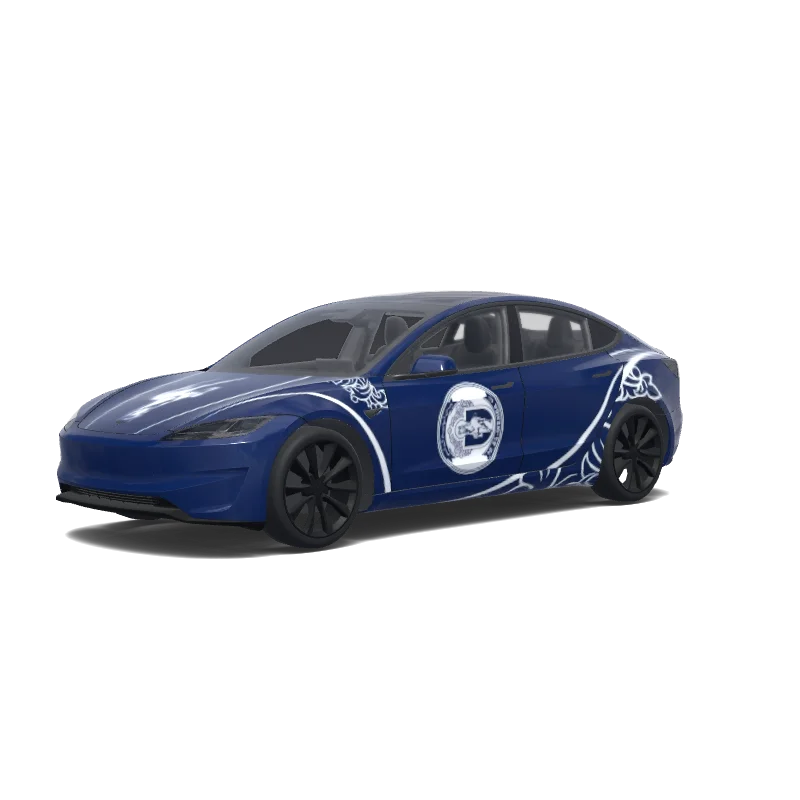
Model 3 ラップデザイン
2024+ · Performance

デザイン者
Aris Tsopanellis
AI プロンプトを見る
Tesla Wrap Studio で使用された AI プロンプト
“REFINE THE EXISTING AL-WEHDA TESLA MODEL 3 PERFORMANCE WRAP. Use the CURRENT SUCCESSFUL UV WRAP as the exact base. ABSOLUTELY DO NOT CHANGE THE UV TEMPLATE, PANEL POSITIONS, PANEL SHAPES, ORIENTATION, SCALE, CANVAS SIZE OR MAPPING. The current wrap already maps correctly onto the Tesla Model 3 Performance 2024. This is a DESIGN REFINEMENT ONLY. The goal is to transform the existing design into a sophisticated: AL-WEHDA × TESLA MODEL 3 PERFORMANCE — SPECIAL EDITION Premium, elegant, athletic and visually clean. ⸻ 1. MAIN BODY COLOR Keep the entire vehicle predominantly in the original deep Al-Wehda navy blue. Use navy as approximately 75–80% of the visible design. Use white only for important branding, fine lines and selected ornamental accents. The vehicle should look luxurious from a distance and reveal the Al-Wehda details when viewed closer. ⸻ 2. HOOD / FRUNK — IMPORTANT CHANGE REMOVE the large rectangular white stripe currently running through the hood. Keep the hood predominantly deep navy blue. Place ONLY the original Al-Wehda horse emblem prominently in the center of the hood. Render the horse mainly in clean white with subtle navy internal detailing derived from the original logo. The horse should appear integrated into the bodywork rather than printed inside a white rectangle. Add two very thin, elegant white contour lines running longitudinally near the horse if needed. The horse must remain the dominant hood feature. NO full circular crest on the hood. NO large white rectangle. NO additional text. ⸻ 3. SIDE DOOR CRESTS Keep ONE complete official circular Al-Wehda S.C. crest on each side of the vehicle. REDUCE the current crest size by approximately 20–25%. Reposition each crest visually so the important central horse and club identity remain readable when the texture wraps around the doors. Avoid placing important logo details directly across major door seams. Give the crest more surrounding navy negative space. Both sides must remain symmetrical. DO NOT redesign the official crest. ⸻ 4. FRONT FENDERS Significantly simplify the current white ornamentation. Reduce ornamental density by approximately 30–40%. Use only 2–3 elegant sweeping white lines following the natural shape of the front wheel arch. Use very subtle fragments of the original Al-Wehda ornamental artwork. The front quarter should feel sporty and aerodynamic rather than heavily decorated. ⸻ 5. REAR DOORS & REAR QUARTER PANELS Gradually increase the ornamental artwork toward the rear of the vehicle. Allow the traditional Al-Wehda decorative motifs to become more expressive behind the side crest and toward the rear wheel arch. Create a visual flow: CLEAN FRONT → CLUB CREST AT CENTER → RICHER HERITAGE DETAIL TOWARD REAR Keep enough navy negative space so the design remains premium. ⸻ 6. ORNAMENTAL STYLE Use ONLY ornamental elements already present in the supplied official Al-Wehda crest. Do not invent unrelated flowers or patterns. Convert these elements into elegant thin-line graphics. The ornamentation should feel like subtle engraved heritage artwork integrated into a modern performance vehicle. Use varying line weight sparingly. Avoid visual clutter. ⸻ 7. FRONT BUMPER Keep: AL-WEHDA on the correct front bumper UV panel. Use clean bold white lettering over the deep navy background. Maintain excellent readability. Do not add additional text around it. ⸻ 8. REAR DESIGN Keep the rear predominantly navy. Use restrained white double-line accents and selected ornamental elements around the rear quarter areas. Do not place another complete circular crest on the rear. Do not overcrowd the rear bumper. Maintain a clean performance-car appearance. ⸻ 9. ROOF / GLASS RELATIONSHIP The Tesla glass roof remains untouched. Design the navy bodywork around the glass so the black panoramic roof visually integrates with the dark navy body. Do not place artwork over glass areas. ⸻ 10. COLOR RESTRICTION Use ONLY: AL-WEHDA DEEP NAVY BLUE PURE WHITE The Tesla glass, wheels, lights and existing vehicle components remain untouched. NO gradients. NO metallic textures. NO chrome graphics. NO flames. NO camouflage. NO sponsor logos. NO extra colors. NO random racing stripes. ⸻ 11. DESIGN HIERARCHY From a distance, the vehicle should first appear as a sophisticated deep navy performance Tesla. At medium distance, the white horse on the hood and side crests should become clearly visible. At close distance, the fine Al-Wehda ornamental heritage details should become noticeable. The design must NOT look like an advertising vehicle. It should look like a professionally commissioned limited-edition factory livery. ⸻ 12. CRITICAL UV RULE — DO NOT VIOLATE The supplied current wrap has already been successfully tested on the Tesla Model 3 Performance visualization. Therefore: DO NOT REGENERATE THE UV TEMPLATE. DO NOT MOVE ANY PANEL. DO NOT CHANGE PANEL GEOMETRY. DO NOT ROTATE PANELS. DO NOT CROP THE CANVAS. DO NOT CREATE A 3D CAR. DO NOT CREATE A MOCKUP. Modify artwork ONLY INSIDE the exact existing mapped panel boundaries. Preserve the current successful UV orientation. Final output: Exact same flat 2D Tesla Model 3 Performance UV wrap texture, same dimensions and panel mapping, transparent/black unused space, maximum-resolution PNG. Overall visual target: Modern Tesla performance design + authentic Al-Wehda heritage + restrained luxury + strong navy-and-white identity.”
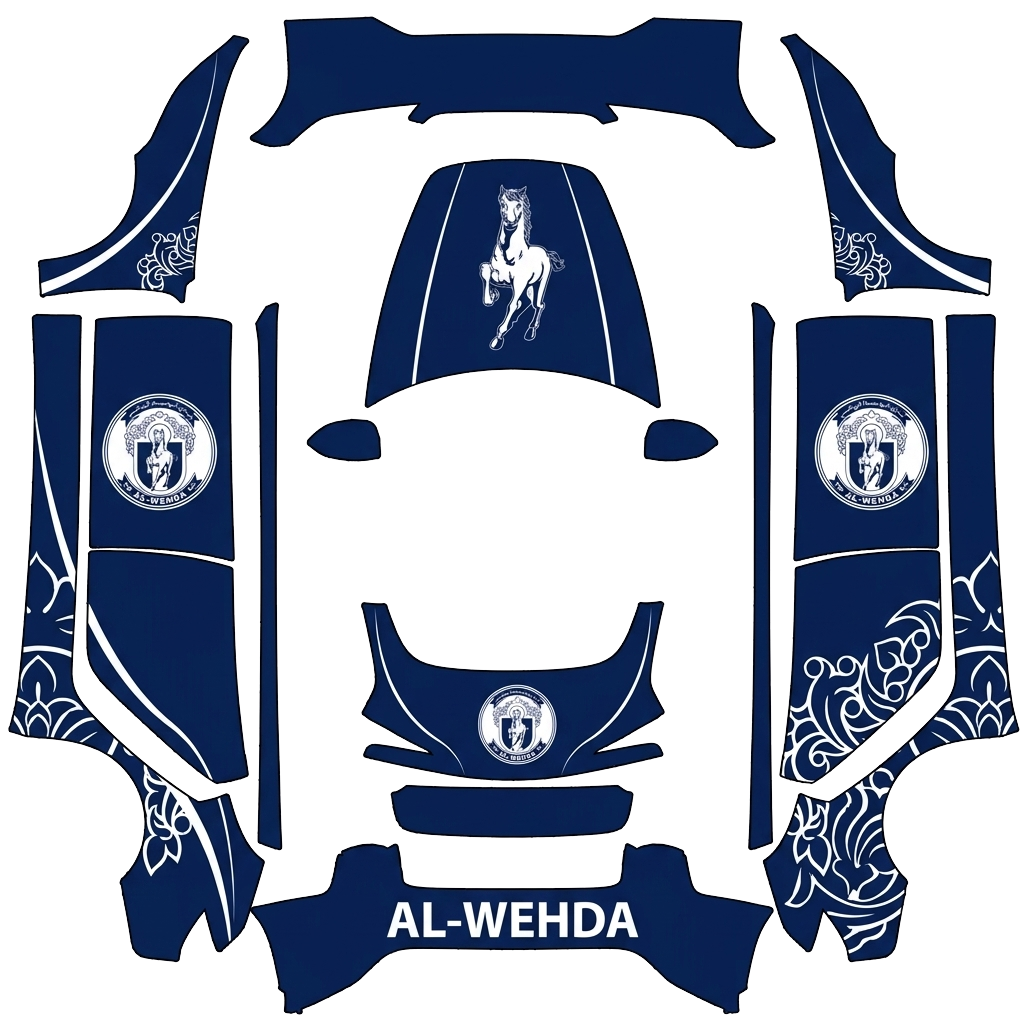
Tesla Paint Shop で使用
Tesla でこのデザインをプレビュー
PNG をダウンロードすると、Tesla の車載画面または Tesla アプリでこのデザインを確認できます。
ファイル要件を確認中
Tesla Paint Shop のファイル要件
Tesla 公式のファイル要件を見るTesla の要件このファイル
形式
Tesla の要件PNG
このファイル確認中…
キャンバスサイズ
Tesla の要件各辺 512〜1024 px
このファイル確認中…
ファイル
Tesla の要件1 MB 以下 · 有効なファイル名
このファイル確認中…
車両テンプレート
Tesla の要件一致する公式テンプレート
このファイル確認中…
Tesla Paint Shop の画面上の 3D プレビュー専用で、印刷や施工には使用できません。
使用方法
このラッピングを Tesla に追加
- 01
PNG をダウンロード
Paint Shop 対応の PNG をスマートフォンまたはパソコンに保存します。
- 02
Tesla に送信
Tesla アプリ v4.59.0 以降で Creations → Wrap → Upload を開きます。または、対応 USB ドライブのルートにある Wraps フォルダへ PNG を保存します。
- 03
Paint Shop で適用
Tesla で Toybox → Paint Shop → Wraps を開き、デザインを選択します。